The CSV file doesn't require a specific structure, the import schema can be set manually for each file upon import: you will match field with field upot the actual import.
Of course, just make sure you have all the fields that you need and that you have in your LMS.
Below you can see the default options. The separator can be a comma or a semicolon: if you choose "auto-detect", the system will detect it for you. Additionally, select the "header" option only if your file really has a header :-). Finally, UTF-8 is the correct type of charset, but it has to match the charset on your server.
## File Options [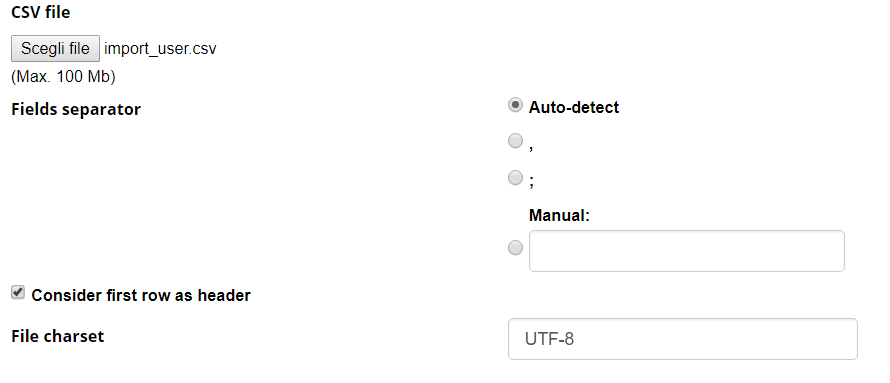](https://docs2.formalms.org/uploads/images/gallery/2024-02/image.png) ## Import Options [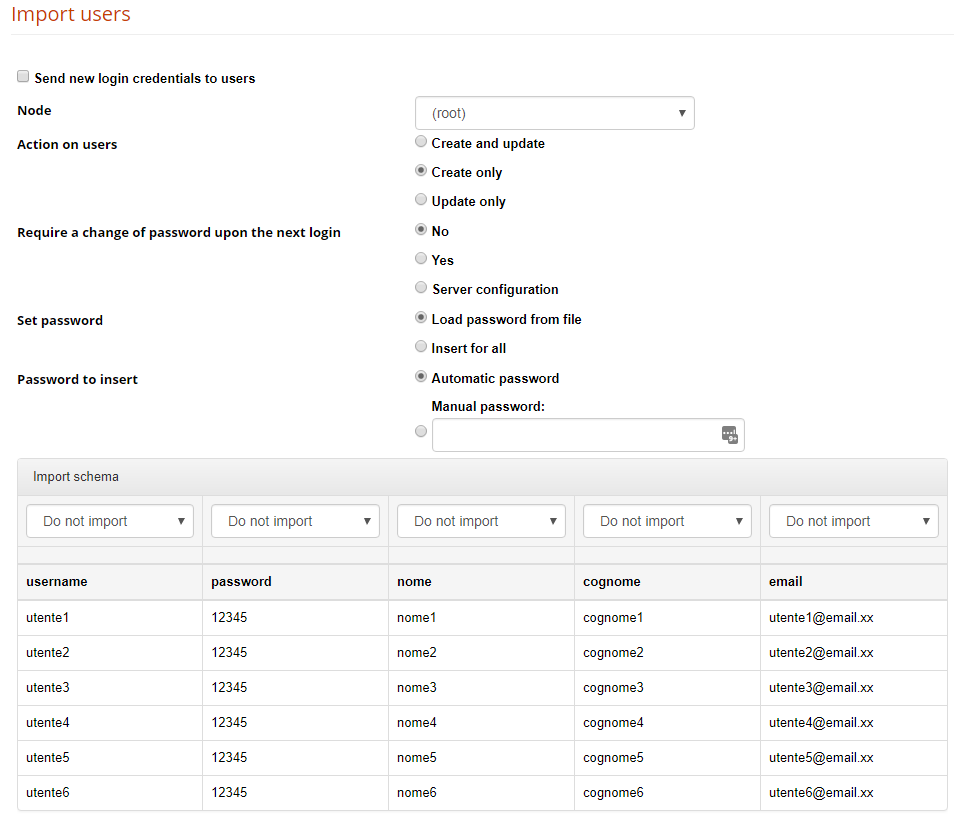](https://docs2.formalms.org/uploads/images/gallery/2024-02/zXzimage.png)**Send new login credentials to users** If flagged, the registration email with user credentials is sent to each imported user
**Node** All the imported users will be added to the selected node. You can still import users to different nodes at a time, check the schema options below. **Action on users** Define what to do if a user is already present or not: create new and update existing, just create new users ignoring existing ones, just update existing while ignoring the new ones. **Require password change upon next login** Define if the user should be prompted to change password on next login. They will need anyway to know a default password. **Set password** Choose if you want to load the password from the imported file, or set it with the following method (automatic or manual). Note: If “load from file” is chosen and the password field in the imported file is left empty, the password creation method will be used instead **Password create** Automatically sets a different random password for each user, Manual password: this will be the default password for all users **Import Schema** Select the forma field in which import each file column**Folder Name**: you can use this value in the import schema to insert users in different org-chart nodes. Add a column to your import file to specify the folder wher you want the user to be inserted. Field values must correspond to existing org-chart node names
**Language**: You can set the language for each imported user by mapping a column to the Language field. The value must be the language name written in full (e.g., `italian`, `english`). Do not use language codes — only the plain language name is accepted