# Event Manager
Forma LMS allows notifications to be automatically sent to users.
Notification events can be set from:
*Admin > Settings > System Configuration > Event Manager*
## Notifications Settings
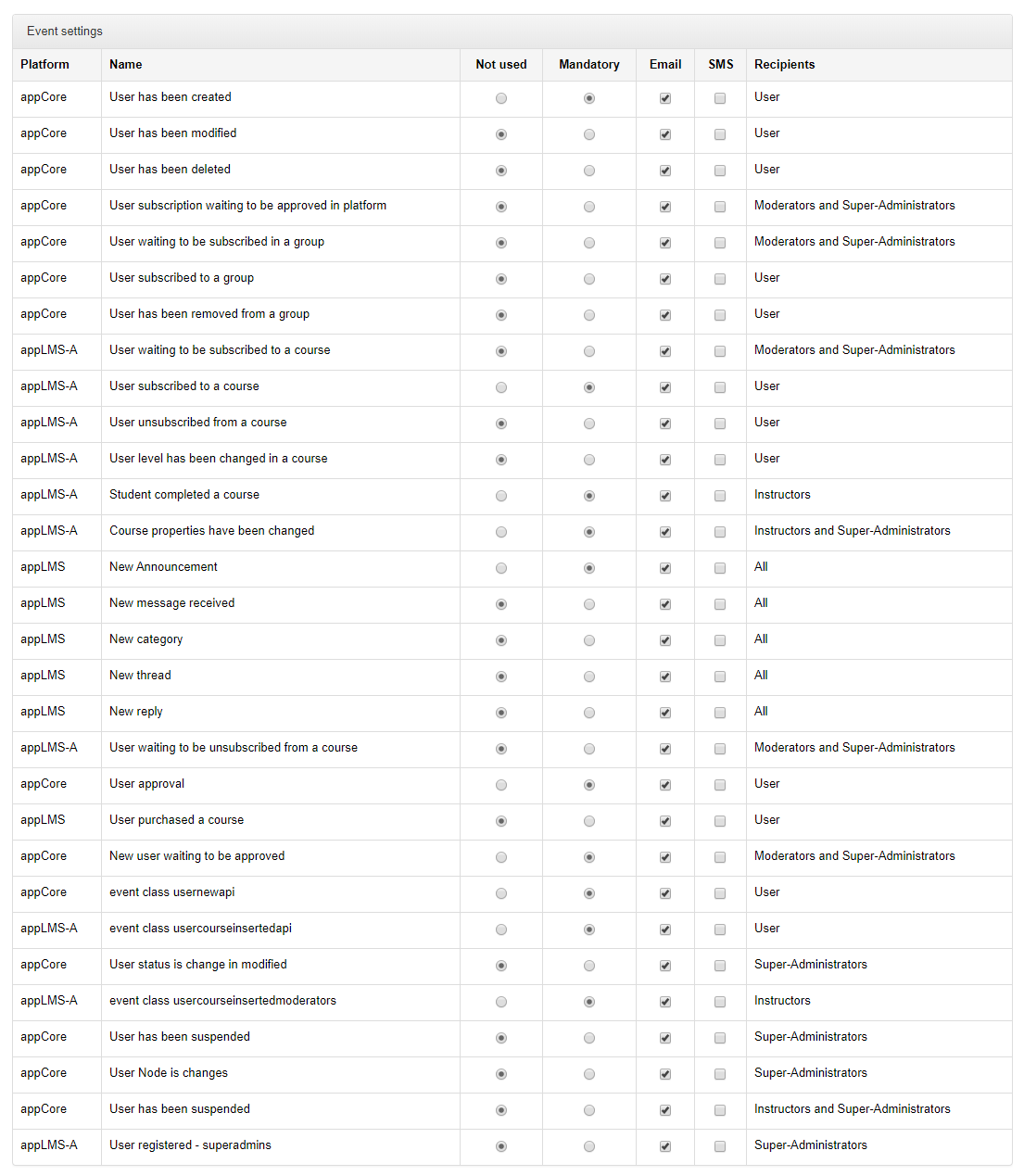
This is the list of available notifications:
[](https://docs2.formalms.org/uploads/images/gallery/2024-01/jCQimage.png)
- **Platform**
- Part of the system where the notification is generated
- **Name**
- Description of the event that will generate a notification
- **Not Used**
- Notification won't be sent
- **Mandatory**
- The selected notification will be sent to involved users, based on event type
- **Email / SMS**
- Define whether the notification should be sent by email and/or SMS.
Note: for SMS to be sent, a dedicated service must be configured. Check [SMS configuration](https://docs2.formalms.org/books/reference-guide/page/system-configuration#bkmrk-sms)
- **Recipients**
- Description of the type of recipients for each notification
## Notification Text
The text of automatic notification events can be modified through the Language Management feature:
*Admin > Settings > **[Language Management](https://docs2.formalms.org/books/reference-guide/page/language-management)***
Just search for part of the text you need to edit