# Additional Fields

Additional fields can be associated to users, or to other platform entities such as org-chart nodes, courses and learning objects

## Additional Fields (Users)

User additional fields can be created and managed under:

<span style="background-color: rgb(206, 212, 217);">*Admin &gt; Settings &gt; Additional Fields &gt; Additional Fields*</span>

[![image.png](https://docs2.formalms.org/uploads/images/gallery/2024-01/scaled-1680-/EVIimage.png)](https://docs2.formalms.org/uploads/images/gallery/2024-01/EVIimage.png)

Different field types are available:

- Text Field: create a standard text input field
- Free text Field: create a textarea
- Date: allow inserting a date
- Dropdown: create a list of options the user can choose from
- Upload: user will be able to upload a file upon registration
- Textlabel: add a static description text inside the registration form
- Fiscal Code: text field for Italian fiscal code
- Yes/No: creates a radio button select field

<p class="callout success">Tip:  
You can assign different fields to different [orgchart nodes](https://docs2.formalms.org/books/reference-guide/page/users-and-organization-chart#bkmrk-assign-field-to-node), and create custom registration forms using the [advanced registration](https://docs2.formalms.org/books/reference-guide/page/system-configuration#bkmrk-register)</p>

## Custom Fields (Other items)

Can be configured under:

<span style="background-color: rgb(206, 212, 217);">*Admin &gt; Settings &gt; Additional Fields &gt; Custom Fields Manager*</span>

[![image.png](https://docs2.formalms.org/uploads/images/gallery/2024-01/scaled-1680-/b4Yimage.png)](https://docs2.formalms.org/uploads/images/gallery/2024-01/b4Yimage.png)

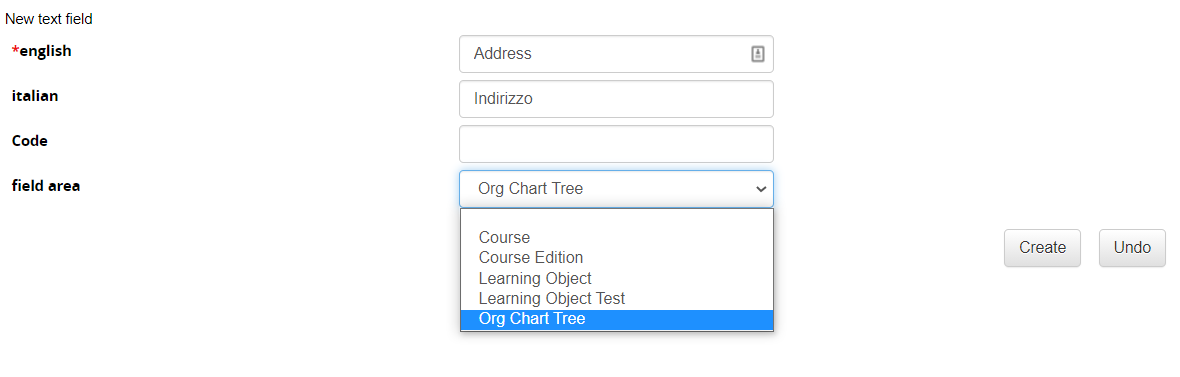
Two kinds of field are available:

- Text Field: create a standard text input field
- Dropdown: create a list of options the user can choose from

You can associate custom fields to different platform items to extend their configurations:

- Courses
- Learning Objects
- Organization Chart Nodes

These fields will be then available in reports